A hook you can record now
Open with a real product screen and a clear promise to explain the flow.
I will start at AQW’s official site, show its wallet, AI and Quant paths, then open the real H5 to check account screens, rules and records.
 AQW CREATOR STUDIO
YouTube and X handles appear in the official media hub when published. Use verified destinations only.
AQW / YOUTUBE CREATOR KIT / 2026
A polished, screen-by-screen YouTube shooting plan: show the AQW entry, explain each tap, and let viewers verify the current product and terms.
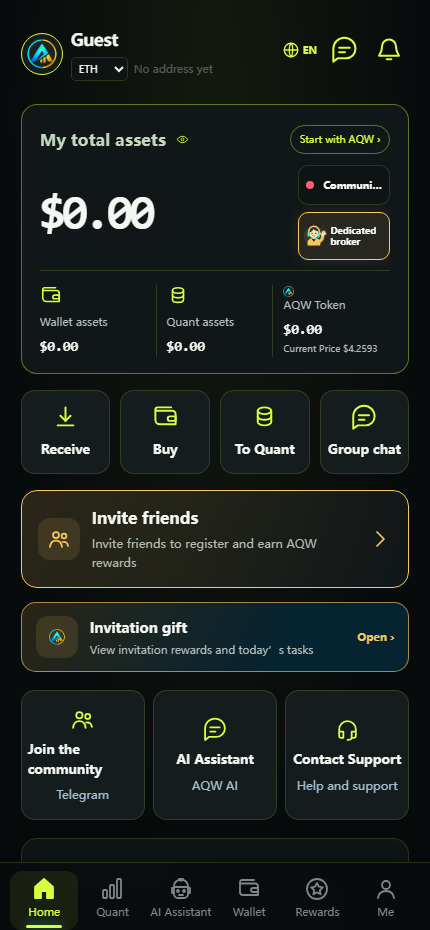
The source script leads with the offer, the big question and the product journey. Its exact English wording is preserved below.
Show what AQW actually does before asking viewers to register.
Open with a real product screen and a clear promise to explain the flow.
I will start at AQW’s official site, show its wallet, AI and Quant paths, then open the real H5 to check account screens, rules and records.
Editing cue: open with a 10–15 second montage of the official site and current app screens, then record the five website views before the original 15 H5 scenes.
Use these five official-site screenshots as visual references while keeping the original registration-to-rewards narration in the 15 scenes below.
Open aqwwallet.com/official/, set the audience’s language if available, and record the address bar. Point to AQW and the Wallet, AI, Quant and Token navigation; hold long enough to read.
AQW presents a multi-chain wallet, AI guidance, Quant exploration and AQW Token in one ecosystem. I will show the visible product route and separate it from longer-term plans.
AQW is a product ecosystem; a homepage claim is not an account balance or a promised return.
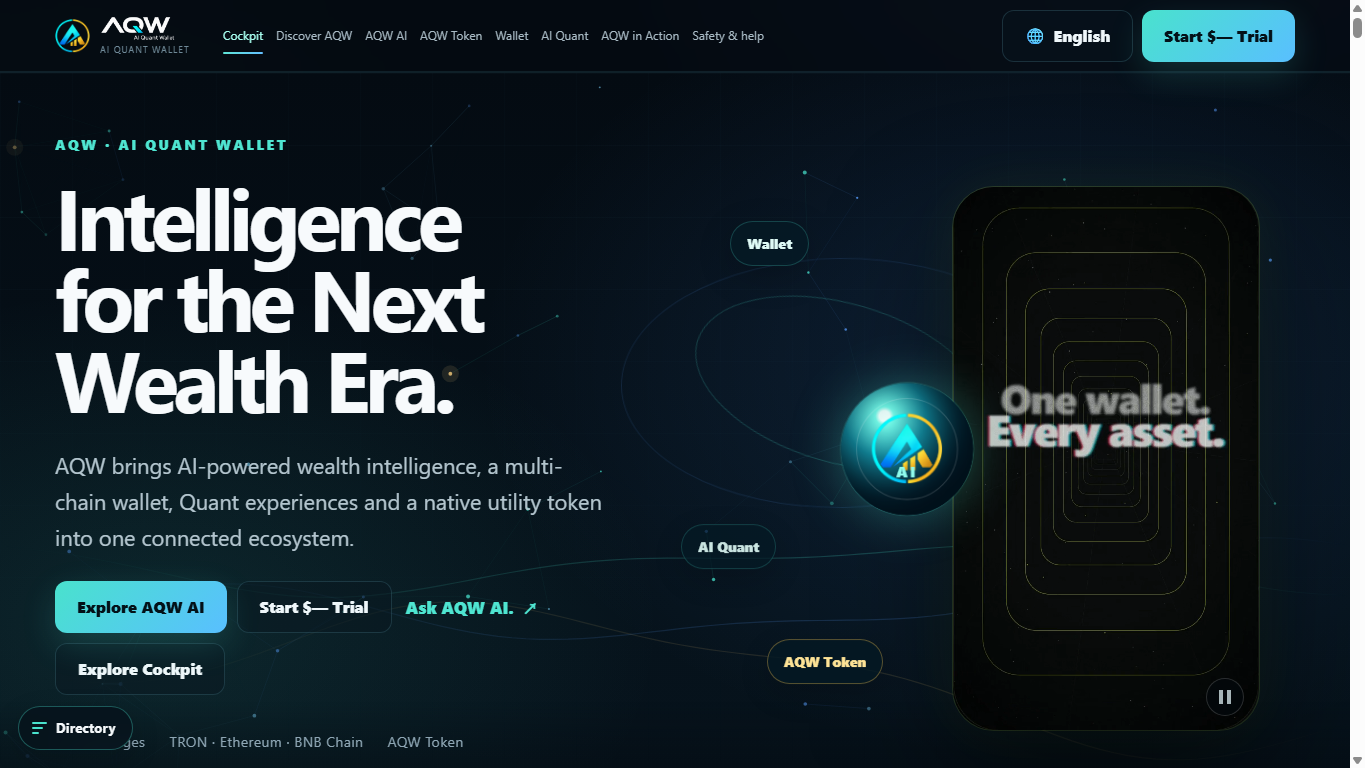 Enlarge website screen ↗OFFICIAL DOMAIN
Click Discover AQW. Show the “assets, AI guidance and quant exploration” introduction and its three suggested next steps. Then briefly scroll to the Wallet, AQW AI and Cockpit cards.
The site suggests exploring the wallet view, the on-page AI guide and the interactive cockpit first. For current access, rules and account data, I will check the official H5 separately.
A site demo helps explain the product; it is separate from an individual account record.
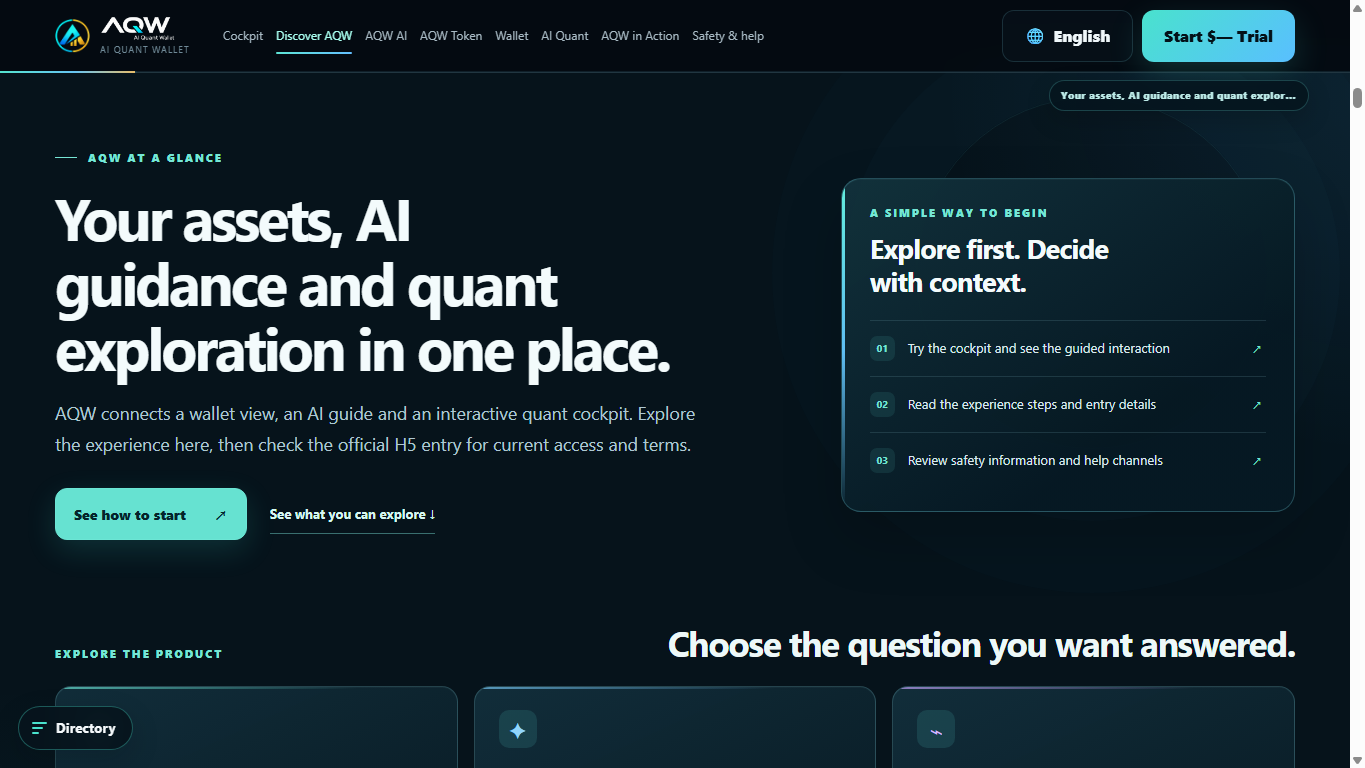 Enlarge website screen ↗EXPLORE FIRST
At “One AQW. Four clear ways in,” select “I want to explore AQW.” Show its cockpit, current H5 entry and wallet-view links. Mention that developer, business and creator paths have separate availability and terms.
If this is your first visit, start with the explore route. You can understand the product before creating a wallet. Other cards are for different audiences, and some capabilities require direct confirmation.
There is a clear path for a new viewer, without implying every roadmap item is live.
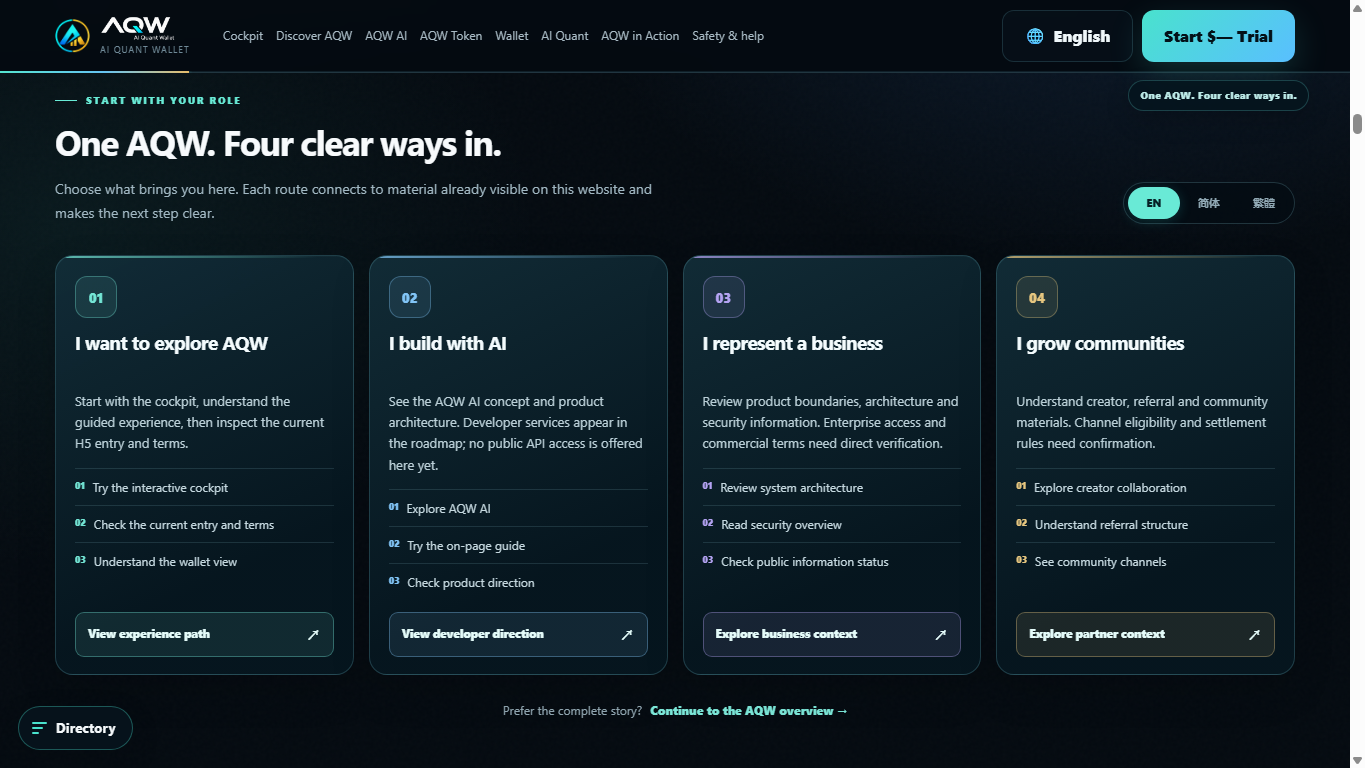 Enlarge website screen ↗FIRST-TIME USER PATH
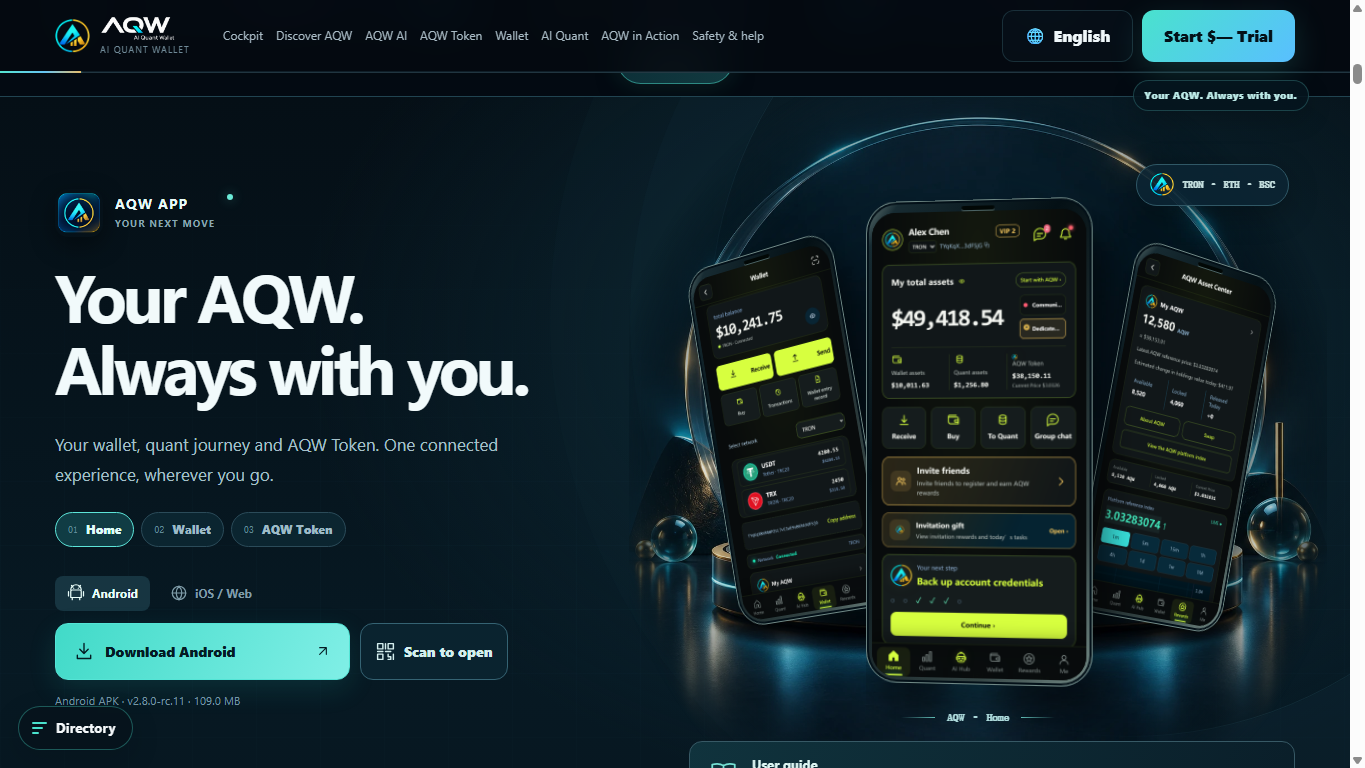
Open the app section. Identify the Home, Wallet and AQW Token marketing screens, then switch to iOS / Web or the current supported download. Scroll to the official community and channel status.
These site images show the intended app experience. I will open the official H5 for the actual screens, and I will use only the download and community links published here.
Marketing images and live account screens are different; the site is the safe place to find current entry links.
 Enlarge website screen ↗OFFICIAL H5 + DOWNLOAD
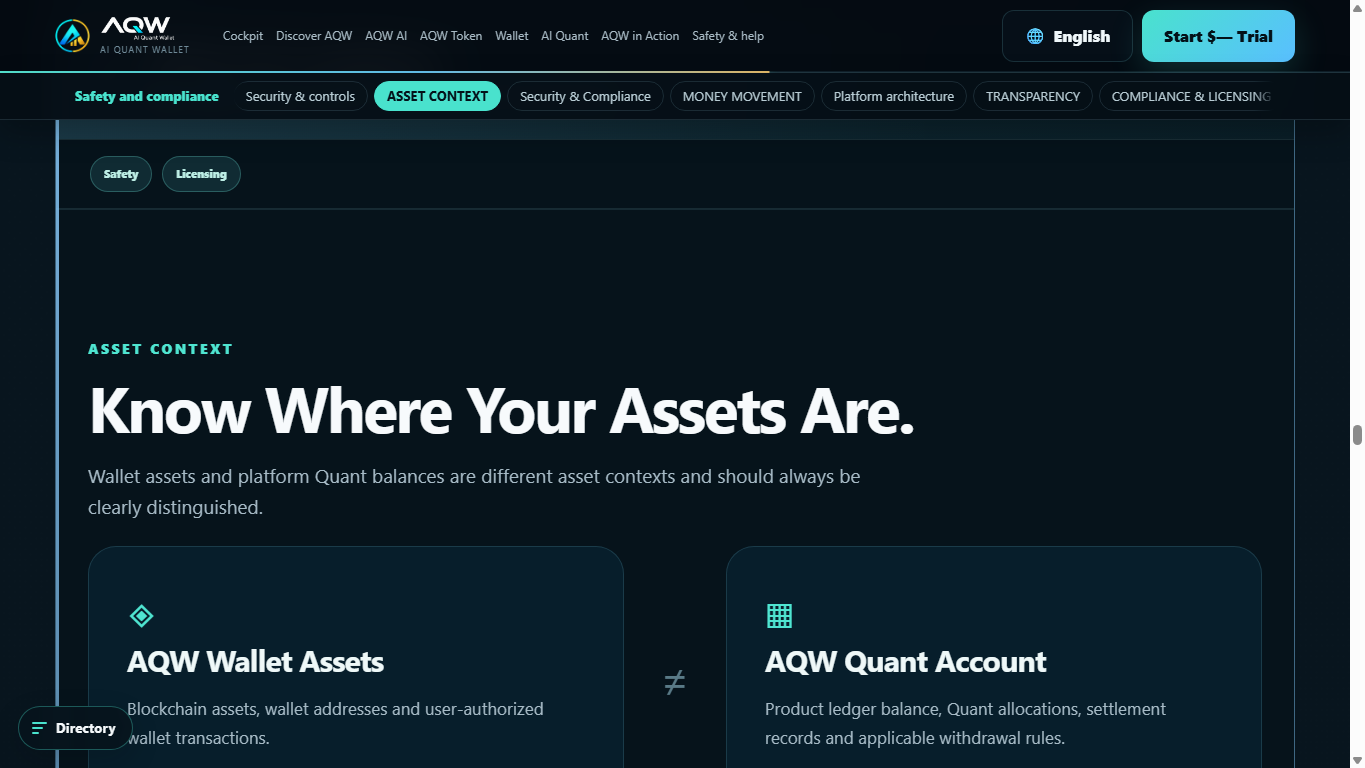
Open Safety & help, then point to the Wallet Assets and Quant Account comparison. Tell viewers to check wallet transactions, Quant allocations, settlements and withdrawal rules in their own account.
Wallet assets and the platform Quant account are different contexts. I will not treat a site illustration, a reference value or an estimate as money already received.
Viewers know what to verify before funding or sharing: account records, fees, rules and support.
 Enlarge website screen ↗WALLET ≠ QUANT ACCOUNT
Once viewers know what AQW is and where to verify current information, follow the 15 original product scenes below.
Go to scene 01 ↓Use this rhythm so viewers understand AQW before you explain features or rewards.
Hold each tap for at least two seconds, then add a short zoom and the matching label.
Capture a clean mobile screen; export YouTube in 16:9 with readable screen inserts and subtitles.
Mask identifiers, credentials, addresses and QR codes before review.
Each scene pairs a spoken line with a product screen. The animated finger marks the area to show on camera; it is a guide overlay, not a live wallet control.
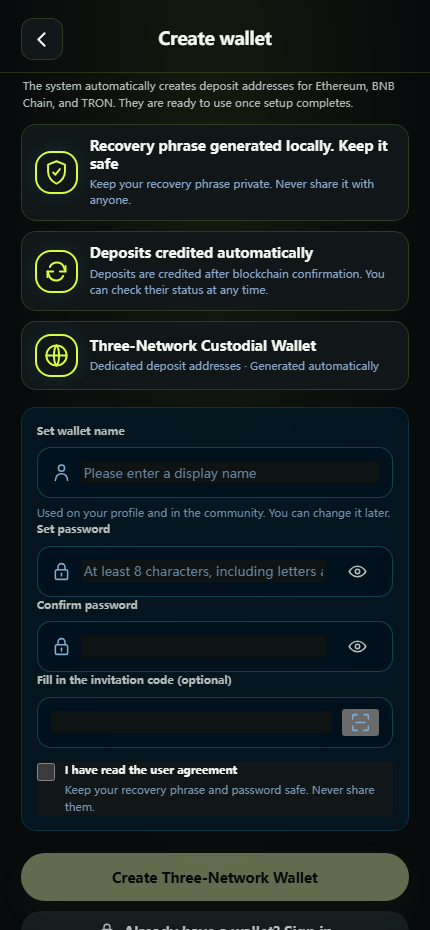
Hello everyone! Curious whether a quantitative wallet can do more than show you charts? Let’s open AQW together and look at the actual screens. New users can start with a zero-risk experience, AQW tokens with a 300 USDT reference value, and a complimentary three-day 30 USDT trial. Behind it is a Wall Street-grade AI quantitative engine designed for steady daily earnings. If you’re wondering whether you need a large amount to begin, stay with me: I’ll show you the registration, the trial, where the results appear, and how the wallet works.
Hi everyone. Today I am opening AQW from its official link and showing the product on screen, step by step. We will create a wallet, find the main sections, and check the account records and current rules. If a registration gift or trial is available in your region, I will show where to verify its conditions before anyone adds funds. Let us start at the official entry.
Start with the event link below this video. Here’s the AQW page, and I’ll keep the screen in view so you can follow every tap.
First, click the event link below this video to open the AQW page. I’ll start at the official wallet entry so you can follow the same path.
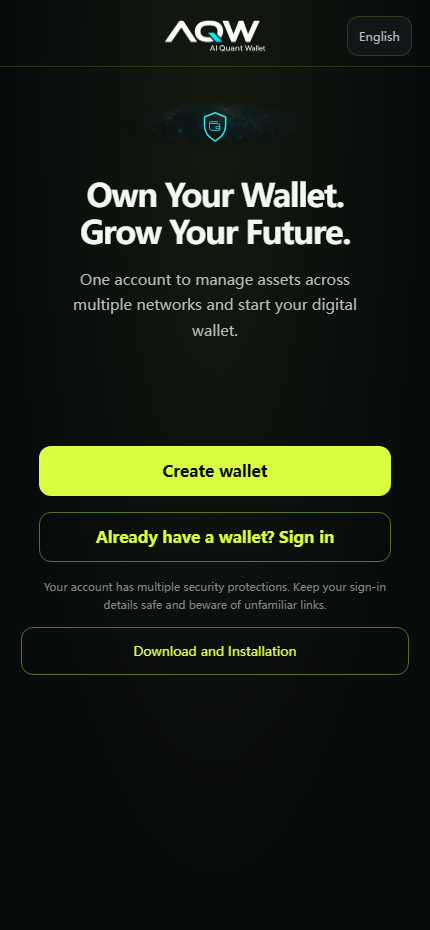
Open the official website first, point to the H5 button, then let the welcome page fill the phone frame. Hold for two seconds before tapping Create wallet.
Say that all links in the description lead back to the official AQW domain.
☝ Show this tap: Create wallet
AQW user app · example screen; record the latest app view
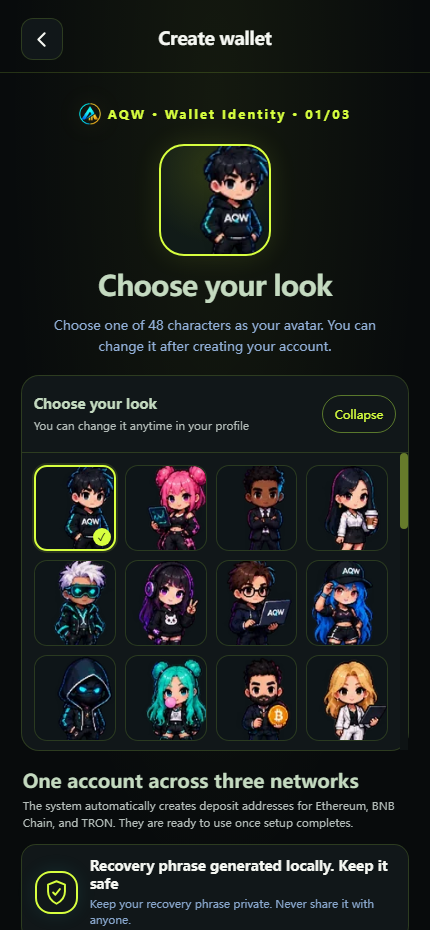
First, pick an avatar you like. It’s a small choice, but it makes the new wallet feel like yours right away.
Choose an avatar you like. This is the first step of creating your wallet identity.
Record the avatar picker and one deliberate tap. Keep the avatar grid visible long enough for viewers to recognise the choice.
The avatar is a profile choice and can be changed later.
☝ Show this tap: Choose your look
AQW user app · example screen; record the latest app view
Now set your username and password. The next screen offers Save or Skip for the recovery phrase; I’ll tap Skip to show the rest of the journey, then come back to the backup before using the wallet for real.
Next I set a wallet name and a strong password. The app also guides me through recovery. I will keep my password and 12-word phrase off camera. If I choose to finish the backup later, I will do it before relying on the wallet.
Show the wallet-name and password fields without typing real credentials on camera; cut to the recovery setup screen.
The 12-word phrase and password stay private. If recovery is skipped, complete the backup before using the wallet.
☝ Show this tap: Create wallet / recovery setup
AQW user app · example screen; record the latest app view
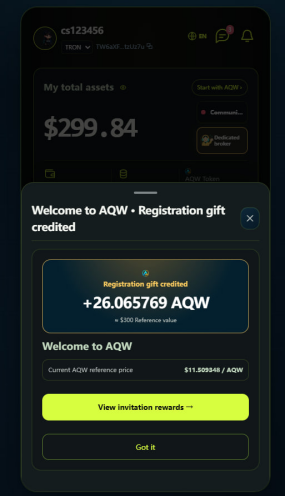
We’re in. Right after registration, the AQW token gift appears with a 300 USDT reference value. Open the panel with me so we can see what the account received.
After registration I check whether a gift appears in my account. If it does, I read the token amount, eligibility and release conditions directly from today’s screen. A displayed reference value is not cash or a guaranteed redemption price.
After a real registration, show the gift panel in your own account. Insert a current capture here; the reference image is only a storyboard placeholder.
State the live amount, eligibility and release rule shown today, not an old reference value.
☝ Show this tap: View gift details
Reference screen · replace with a current recording
Scroll a little further and you’ll find beginner tasks. Pick the ones that fit you, complete them at your own pace, and watch the AQW coin rewards appear in your own account.
Scroll down to see the beginner tasks. You can complete them at your own pace; any AQW reward depends on the current task rules and your account records.
On Home tap Invitation gift, then scroll to the beginner-task list. Pause on eligibility and status; open one detail if available.
A task is complete only when the account record confirms it.
☝ Show this tap: Scroll to beginner tasks
AQW user app · example screen; record the latest app view
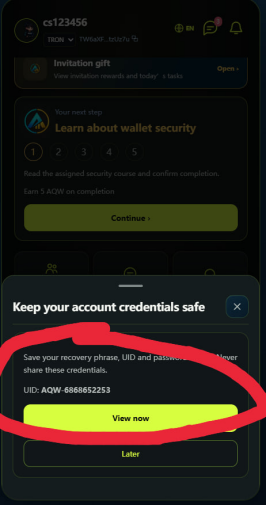
Before we move on, save the UID in this pop-up. It’s the account detail you’ll want to have when you sign in or ask for help later; keep the 12-word recovery phrase private as well.
Pay attention to the pop-up and save your UID. It may help you sign back in or ask support about your account. Your recovery phrase remains the essential backup for wallet access: write it down offline, in order, and never share it.
Show where UID appears, then cut away before any recovery phrase becomes visible. Add a privacy mask over identifiers in editing.
UID helps identify the account; the recovery phrase controls wallet access.
☝ Show this tap: View account credentials
Reference screen · replace with a current recording
Now for the new-user trial: a three-day quantitative package worth 30 USDT through the official Telegram community. I’ll open the bot, tap Start, follow the claim link and show where the CDK takes us. Over three days the trial can show about 1 USD in returns, with a withdrawal path—let’s see the screens in order.
Now I look for the new-user trial. If the current campaign uses an official Telegram bot, I open the official community, tap Start and follow the claim link. I check the live duration and eligibility on my account before describing the offer.
Open the current trial card, then show the official Telegram entry and the bot Start or claim screen only if today’s campaign still uses it.
Trial duration, CDK and claim conditions must match the live campaign and account.
☝ Show this tap: Trial card → community → bot → claim
AQW user app · example screen; record the latest app view
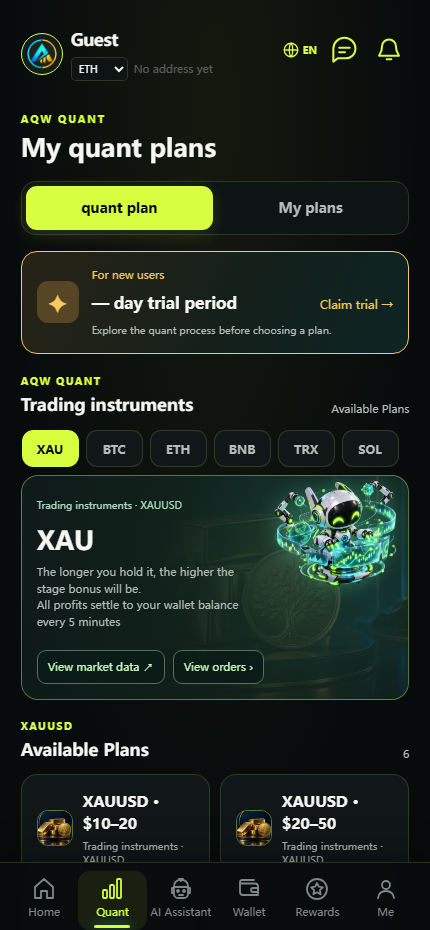
Back on Home, tap Quant. Here you can explore the strategies and the plans available to your account. The entry-level example shows a 20–30% monthly return; open a plan to see its amount and duration, then use My Plans to find your trial order.
From Home I open Quant, then the plans available to my account. Before considering a plan I read its amount range, duration, fees, settlement and risk information. My Plans is where I check an order tied to my own account. Displayed rates describe a plan; they do not guarantee a result.
Return Home, tap Quant, open Available Plans and then My Plans. Hold each title for one second.
Read amount range, duration, fees and risks before mentioning any displayed rate.
☝ Show this tap: Quant → Plans → My Plans
AQW user app · example screen; record the latest app view
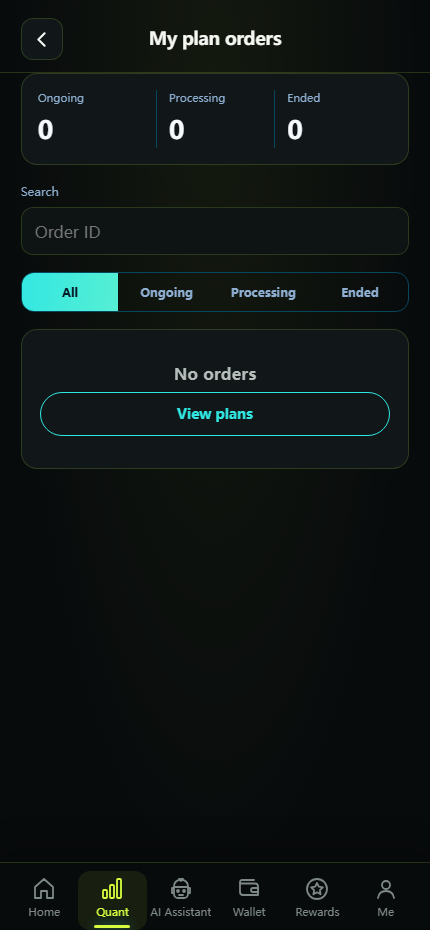
This is the part I wanted to see: Quant activity, order profits and notifications in one place. Figures update every five minutes. I’ll pause on the order screen so you can see where to track them yourself.
Here I open My plan orders and notifications. I check the order state and settlement record before calling any figure a result. If this account has no order, I say so plainly; a dashboard estimate is not an actual payout.
Open My plan orders and point to the status filter and record list; use a real settled record only with sensitive data hidden.
A live estimate is different from a settled record. An empty guest screen proves no order.
☝ Show this tap: My plan orders / notifications
AQW user app · example screen; record the latest app view
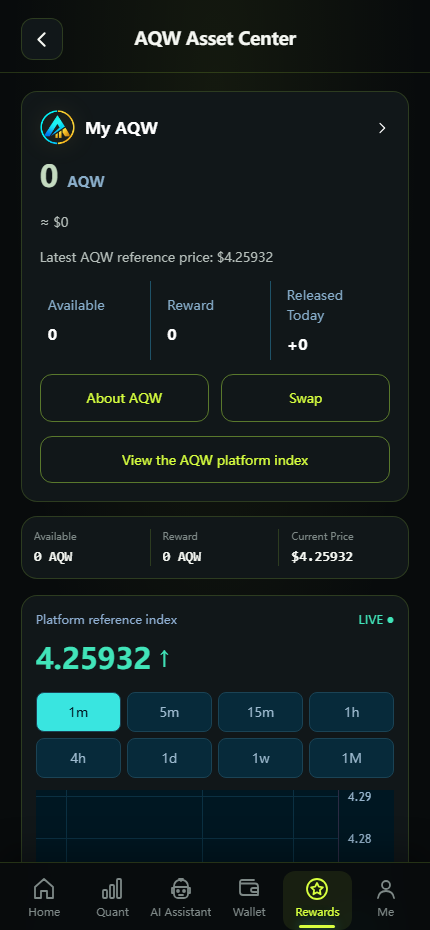
Let’s return Home and look at AQW tokens. They circulate in the primary market, with releases tied to quantitative earnings and withdrawals after release. I’ll point out the balance, release details and the next screen instead of racing past them.
Back on the AQW Asset Center, I separate available tokens, rewards and released tokens. I also open the release and withdrawal rules. The displayed index is a reference figure; it does not promise cash value or liquidity.
Open AQW Asset Center and point separately to Available, Reward and Released Today.
The reference index is not a cash redemption promise; check release and withdrawal conditions.
☝ Show this tap: AQW Asset Center
AQW user app · example screen; record the latest app view
If you want to add funds, tap Receive. Here’s the wallet address, and here’s where the payment network changes. Watch the network choice closely before copying your own address.
Tap Receive from the home or wallet screen, choose the asset and payment network, then copy the address shown in your own wallet. Check that the sender uses the same network. Never send funds to an address shown in this guide’s screenshots.
From Wallet tap Receive, name the selected asset and network, then stop at the address screen. Use your own masked account if an address is needed.
The sender’s network must match; never use an address from this guide.
☝ Show this tap: Receive → select network → copy address
AQW user app · example screen; record the latest app view
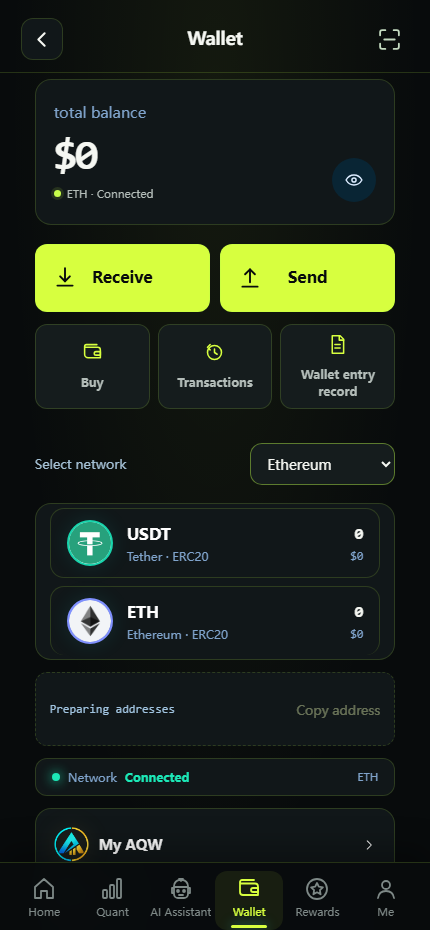
Now open Wallet. This is where the trial earnings are credited; tap Send to see the withdrawal route. I’ll walk through the fields and confirmation screen so the whole path is clear.
Open Wallet to review any settled trial amount in your own balance, then tap Send to see the withdrawal path. Check the asset, network, recipient address, fees and final confirmation. This is a screen demonstration only; do not submit a real transfer for the video.
From Wallet tap Send and show the asset, network, recipient, fees and confirmation path without submitting a transfer.
The video explains the checks; it does not ask viewers to transfer funds.
☝ Show this tap: Wallet → Send → review confirmation
AQW user app · example screen; record the latest app view
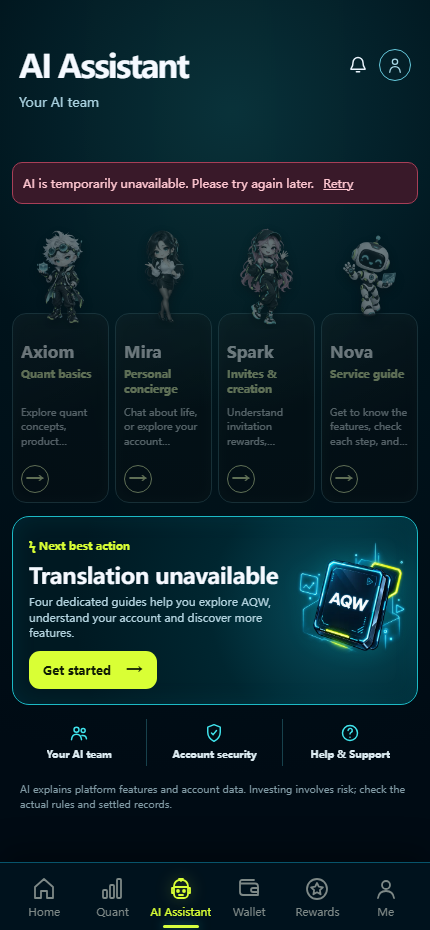
There’s also an AI assistant. Ask it a question about the product and take a look around—it’s an easy way to explore the interface without hunting through menus.
Here is the AI assistant. You can ask it product questions and explore the interface. Treat its answers as guidance and confirm account, fee or transaction details in the official records.
Open the AI hub and show the assistant choices. If the service is unavailable, show its current status honestly and avoid a fabricated answer.
AI guidance should be checked against official terms and account records.
☝ Show this tap: AI Hub / assistant
AQW user app · example screen; record the latest app view
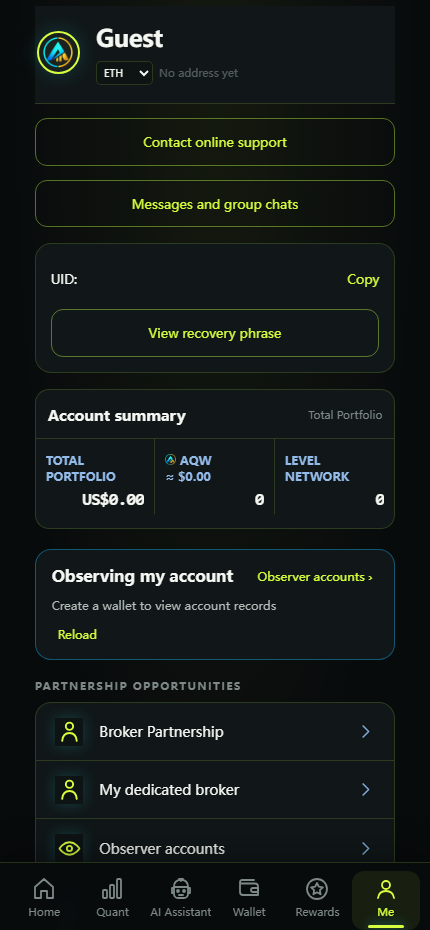
On the Me page you’ll find your account information, customer support and the platform’s official groups. This is the page to return to when you need help.
On the Me page you can find your account information, official support and platform community entry. Use only the current in-app or official-site contact links, and never share your password or recovery phrase with anyone.
Open Me and point to account, support and official community or media links. Blur UID and personal data.
Support contacts should come from the app or official website.
☝ Show this tap: Me → account / support
AQW user app · example screen; record the latest app view
Finally, open Rewards. Here’s where you copy your invitation link, share it with friends and read the rebate mechanism. That completes the route from your first click to inviting someone else.
Finally, open Rewards. Copy your own invitation link and review the current commission and release rules before sharing. To recap: register through the official portal, save your UID and recovery phrase securely, review the Quant plan and account records, understand AQW token release and withdrawal terms, and check any current promotion on the official page. All results depend on actual terms and your own account records.
Open Rewards with a registered demo account, show the personal invitation link and current rules, then close on the official links.
Referral credit and rewards follow live terms; disclose the creator relationship.
☝ Show this tap: Rewards → Invite → commission rules
AQW user app · example screen; record the latest app view
So that’s the full AQW journey: register through the official portal, save your UID, find the registration gift and three-day trial, explore Quant and your order records, understand how AQW tokens are released, then use Wallet and Rewards when you’re ready. The links below take you to the current offer and product pages so you can check the details for yourself.
The original English wording and paragraph order are preserved alongside the new speaking version.
Hello everyone! I’d like to share a great cryptocurrency wallet with you. This is a look at the actual returns I’ve been seeing in my AQW smart quantitative wallet. You don’t need any technical expertise, and there’s no need to spend all day glued to market charts. By entrusting your assets to a Wall Street-grade AI quantitative engine, you can watch your profits roll in steadily every single day—it’s an absolutely fantastic way to earn passive income!(The official website page is displayed here.)
“I know what you’re all wondering: ‘Do I need a large amount of capital to get started?’ Well, I have some great news! To ensure a zero-risk experience for users worldwide, the platform is rolling out an incredible, high-value offer: First, simply register now to receive AQW tokens worth 300 USDT—these tokens will serve as the ‘core computational fuel’ that powers the entire AI quantitative ecosystem! Second, join our official Telegram community, and you’ll get a complimentary three-day quantitative trading trial package, worth 30 USDT!”
Now, let me demonstrate how to register.
1. First, you can click the event link at the bottom of the screen to access the AQW page.2. You can choose an avatar you like.
3. Set username and password
You can choose to save or skip; I’ll click "skip" here.
4. Once registration is successful, you will see that the platform has gifted you AQW tokens worth 300 USDT.5. Scroll down to see the beginner tasks; you can complete these at your own pace. Once finished, you will receive a varying amount of AQW coins.
6. Pay attention to the pop-up window and make sure to save your UID. If you log out without having saved the 12-word recovery phrase, you can use your UID to log back in—it’s quite convenient.7. Click here to claim a three-day trial package for new users.
After joining the TG community, you will receive a message from a bot—click to claim.
Once you enter the bot's chat interface, click "Start," then click the link to claim your CD key (CDK)—you will be automatically redirected.You can then begin experiencing quantitative earnings; the returns over three days amount to approximately 1 USD, which can be withdrawn.
Then you can click "Back" to return to the home page.8. Click "Quantify" to view quantitative strategies and potential returns.
Click here to view the plans currently available for your account.The plan for entry-level users offers a monthly return of 20–30%; you may choose to purchase it based on your own personal circumstances.
Click "My Plans" on the right to view the order for the plan associated with your trial credit.
Scroll down to here and you can see that AI-driven quantitative trading is underway—it has already begun generating returns.9. You can also click here to view real-time order profits and various notifications. Order profits are updated every five minutes—I won’t demonstrate that here.10. Returning to the homepage, you can view your tokens. Currently, AQW tokens are circulating within the primary market and have not yet been listed on the secondary market. Consequently, the platform releases a certain percentage of tokens based on the daily quantitative earnings generated by users. Once released, these funds can be withdrawn at any time.
11. Next, let’s look at how to deposit funds. Click "Receive" on the home page and copy the address; you can then use it to transfer funds into your wallet.
Click here to switch the payment network.Currently, three methods are supported.12. To withdraw funds, tap on "Wallet." You can see there that the earnings generated from the free trial package I just used have already been credited to my account.Click "Send" to withdraw your funds.13. There’s an AI assistant interface here; you can interact with the AI if you have any questions—it’s quite interesting.
14. And then, on this page, you can view some information about your account.Customer support and official platform-integrated groups are available here.15. Finally, here is the rewards panel, where you can earn commissions by inviting friends.
Copy your link and send it to friends to promote it.
You can view the platform's rebate mechanism here.
Finally, let’s briefly summarize the entire process.
First, register via the official AQW portal and save your UID, which you will need for future logins and account inquiries.
Second, eligible new users can check for a 300U AQW token registration bonus, as well as a three-day quantitative trading trial.
Third, visit the "Quant" page to review the earnings metrics, operational rules, and risk disclosures for the entry-level plan; you can then track actual settlement results through your account records.
Fourth, familiarize yourself with the release conditions, availability status, and withdrawal rules for AQW tokens.
If you are a content creator, you may also want to explore the official referral commission structure and partnership programs.
For details on specific promotions, click the official link provided in the video description to view the current terms and conditions.
Remember: always understand the rules before deciding whether to participate. All earnings and rewards are subject to the actual terms and your account records.
I hope this video has helped you gain a clearer understanding of AQW.
Choose one title and description. Replace the invitation link with your own, disclose the partnership where required, and keep offer details tied to the current official terms.
I follow the AQW journey on screen: registration, safety setup, the wallet, Quant, token balances and referrals. Every click is shown so you can check the current rules yourself. Official website: https://aqwwallet.com/official/#home AQW H5: https://aqwwallet.com/welcome Official media and download: https://aqwwallet.com/official/#app-connect User guide: https://aqwwallet.com/official/manual.html My invitation link: [Add your own AQW invitation link here] Disclosure: This video contains my AQW referral link. Any rewards depend on current terms. Read the risks before deciding. Telegram: https://t.me/aqwalletofficial
From your first avatar choice to the account home screen, this video shows the exact screens a new user should understand before moving funds. Official website: https://aqwwallet.com/official/#home AQW H5: https://aqwwallet.com/welcome Official media and download: https://aqwwallet.com/official/#app-connect User guide: https://aqwwallet.com/official/manual.html My invitation link: [Add your own AQW invitation link here] Disclosure: This video contains my AQW referral link. Any rewards depend on current terms. Read the risks before deciding. Telegram: https://t.me/aqwalletofficial
A close-up tutorial for setting up an AQW account safely. I show where to find your UID and why the 12-word recovery phrase must stay private. Official website: https://aqwwallet.com/official/#home AQW H5: https://aqwwallet.com/welcome Official media and download: https://aqwwallet.com/official/#app-connect User guide: https://aqwwallet.com/official/manual.html My invitation link: [Add your own AQW invitation link here] Disclosure: This video contains my AQW referral link. Any rewards depend on current terms. Read the risks before deciding. Telegram: https://t.me/aqwalletofficial
The trial flow can involve the AQW community and a CDK. I show the path and explain which details must be verified in the live campaign and your account. Official website: https://aqwwallet.com/official/#home AQW H5: https://aqwwallet.com/welcome Official media and download: https://aqwwallet.com/official/#app-connect User guide: https://aqwwallet.com/official/manual.html My invitation link: [Add your own AQW invitation link here] Disclosure: This video contains my AQW referral link. Any rewards depend on current terms. Read the risks before deciding. Telegram: https://t.me/aqwalletofficial
From the official community to the bot and claim screen, follow this visual walkthrough. Check the bot identity and current offer before opening links. Official website: https://aqwwallet.com/official/#home AQW H5: https://aqwwallet.com/welcome Official media and download: https://aqwwallet.com/official/#app-connect User guide: https://aqwwallet.com/official/manual.html My invitation link: [Add your own AQW invitation link here] Disclosure: This video contains my AQW referral link. Any rewards depend on current terms. Read the risks before deciding. Telegram: https://t.me/aqwalletofficial
We open the Quant page and review amounts, duration, costs, risks and account records. Indicative figures are not guaranteed returns. Official website: https://aqwwallet.com/official/#home AQW H5: https://aqwwallet.com/welcome Official media and download: https://aqwwallet.com/official/#app-connect User guide: https://aqwwallet.com/official/manual.html My invitation link: [Add your own AQW invitation link here] Disclosure: This video contains my AQW referral link. Any rewards depend on current terms. Read the risks before deciding. Telegram: https://t.me/aqwalletofficial
The trial card is only the beginning. I show where to find My Plans, order activity and settled account records. Official website: https://aqwwallet.com/official/#home AQW H5: https://aqwwallet.com/welcome Official media and download: https://aqwwallet.com/official/#app-connect User guide: https://aqwwallet.com/official/manual.html My invitation link: [Add your own AQW invitation link here] Disclosure: This video contains my AQW referral link. Any rewards depend on current terms. Read the risks before deciding. Telegram: https://t.me/aqwalletofficial
The AQW token page has several balance states. This screen tour explains what to check before assuming a reference value is withdrawable cash. Official website: https://aqwwallet.com/official/#home AQW H5: https://aqwwallet.com/welcome Official media and download: https://aqwwallet.com/official/#app-connect User guide: https://aqwwallet.com/official/manual.html My invitation link: [Add your own AQW invitation link here] Disclosure: This video contains my AQW referral link. Any rewards depend on current terms. Read the risks before deciding. Telegram: https://t.me/aqwalletofficial
I demonstrate Receive, network selection and copying your own address. Match the sender’s network before transferring any asset. Official website: https://aqwwallet.com/official/#home AQW H5: https://aqwwallet.com/welcome Official media and download: https://aqwwallet.com/official/#app-connect User guide: https://aqwwallet.com/official/manual.html My invitation link: [Add your own AQW invitation link here] Disclosure: This video contains my AQW referral link. Any rewards depend on current terms. Read the risks before deciding. Telegram: https://t.me/aqwalletofficial
A screen-only guide to Wallet → Send. We inspect the asset, network, recipient, fees and confirmation before any real transfer. Official website: https://aqwwallet.com/official/#home AQW H5: https://aqwwallet.com/welcome Official media and download: https://aqwwallet.com/official/#app-connect User guide: https://aqwwallet.com/official/manual.html My invitation link: [Add your own AQW invitation link here] Disclosure: This video contains my AQW referral link. Any rewards depend on current terms. Read the risks before deciding. Telegram: https://t.me/aqwalletofficial
Dashboard estimates and settled account records can look similar. Here is where I check each one and why the distinction matters. Official website: https://aqwwallet.com/official/#home AQW H5: https://aqwwallet.com/welcome Official media and download: https://aqwwallet.com/official/#app-connect User guide: https://aqwwallet.com/official/manual.html My invitation link: [Add your own AQW invitation link here] Disclosure: This video contains my AQW referral link. Any rewards depend on current terms. Read the risks before deciding. Telegram: https://t.me/aqwalletofficial
I explore the AI assistant interface and show when to return to official terms, fees or account records for confirmation. Official website: https://aqwwallet.com/official/#home AQW H5: https://aqwwallet.com/welcome Official media and download: https://aqwwallet.com/official/#app-connect User guide: https://aqwwallet.com/official/manual.html My invitation link: [Add your own AQW invitation link here] Disclosure: This video contains my AQW referral link. Any rewards depend on current terms. Read the risks before deciding. Telegram: https://t.me/aqwalletofficial
A quick tour of the Me page: account details, support and community. I also cover the one thing no support agent should ever ask for: your recovery phrase. Official website: https://aqwwallet.com/official/#home AQW H5: https://aqwwallet.com/welcome Official media and download: https://aqwwallet.com/official/#app-connect User guide: https://aqwwallet.com/official/manual.html My invitation link: [Add your own AQW invitation link here] Disclosure: This video contains my AQW referral link. Any rewards depend on current terms. Read the risks before deciding. Telegram: https://t.me/aqwalletofficial
Open Rewards to find your own link and inspect the current commission rules. If this video is sponsored, I say so clearly in the description. Official website: https://aqwwallet.com/official/#home AQW H5: https://aqwwallet.com/welcome Official media and download: https://aqwwallet.com/official/#app-connect User guide: https://aqwwallet.com/official/manual.html My invitation link: [Add your own AQW invitation link here] Disclosure: This video contains my AQW referral link. Any rewards depend on current terms. Read the risks before deciding. Telegram: https://t.me/aqwalletofficial
A compact AQW product tour with each screen in order. Use it as a map, then read the current rules before joining any plan. Official website: https://aqwwallet.com/official/#home AQW H5: https://aqwwallet.com/welcome Official media and download: https://aqwwallet.com/official/#app-connect User guide: https://aqwwallet.com/official/manual.html My invitation link: [Add your own AQW invitation link here] Disclosure: This video contains my AQW referral link. Any rewards depend on current terms. Read the risks before deciding. Telegram: https://t.me/aqwalletofficial
Before receiving funds, verify the asset, network, destination address and recovery backup. This guide points to the screens where each check happens. Official website: https://aqwwallet.com/official/#home AQW H5: https://aqwwallet.com/welcome Official media and download: https://aqwwallet.com/official/#app-connect User guide: https://aqwwallet.com/official/manual.html My invitation link: [Add your own AQW invitation link here] Disclosure: This video contains my AQW referral link. Any rewards depend on current terms. Read the risks before deciding. Telegram: https://t.me/aqwalletofficial
We inspect the token page and its available, locked and released balances. A reference number is not a promise of cash value or liquidity. Official website: https://aqwwallet.com/official/#home AQW H5: https://aqwwallet.com/welcome Official media and download: https://aqwwallet.com/official/#app-connect User guide: https://aqwwallet.com/official/manual.html My invitation link: [Add your own AQW invitation link here] Disclosure: This video contains my AQW referral link. Any rewards depend on current terms. Read the risks before deciding. Telegram: https://t.me/aqwalletofficial
A creator-focused checklist: follow the registration-to-rewards order, show each tap, hide private data and verify today’s campaign copy. Official website: https://aqwwallet.com/official/#home AQW H5: https://aqwwallet.com/welcome Official media and download: https://aqwwallet.com/official/#app-connect User guide: https://aqwwallet.com/official/manual.html My invitation link: [Add your own AQW invitation link here] Disclosure: This video contains my AQW referral link. Any rewards depend on current terms. Read the risks before deciding. Telegram: https://t.me/aqwalletofficial
The trial offer, plan details and wallet balance answer different questions. I compare where to find each and what not to infer from them. Official website: https://aqwwallet.com/official/#home AQW H5: https://aqwwallet.com/welcome Official media and download: https://aqwwallet.com/official/#app-connect User guide: https://aqwwallet.com/official/manual.html My invitation link: [Add your own AQW invitation link here] Disclosure: This video contains my AQW referral link. Any rewards depend on current terms. Read the risks before deciding. Telegram: https://t.me/aqwalletofficial
Official website, H5, user guide, product information and community in one description. I show how to use them without trusting random links. Official website: https://aqwwallet.com/official/#home AQW H5: https://aqwwallet.com/welcome Official media and download: https://aqwwallet.com/official/#app-connect User guide: https://aqwwallet.com/official/manual.html My invitation link: [Add your own AQW invitation link here] Disclosure: This video contains my AQW referral link. Any rewards depend on current terms. Read the risks before deciding. Telegram: https://t.me/aqwalletofficial
Use this process with your assigned AQW contact. Payment rates, referral percentages and approval terms belong in the signed campaign agreement.
Agree on channel, language, region, video angle, deadline, tracked link and current campaign terms before filming.
Record the product path, hide private data, and send a draft video plus final title and description to your assigned AQW contact for review.
After approval, publish with the verified official links and a clear referral or sponsorship disclosure. Keep the final YouTube URL and publish timestamp.
Share agreed performance metrics and referral evidence. Commissions and payment are reconciled against valid records, reversals and the signed agreement; never infer earnings from views alone.
Use the official website and H5 links below. Find the current community and media channels on the official site.